
REST API Development Explained: How APIs Connect Websites, Apps and Business Systems
REST API development explained in plain English: how APIs let your website, mobile app and business systems share one source of truth, and the versioning, error, security and reliability rules we follow on every API we build.
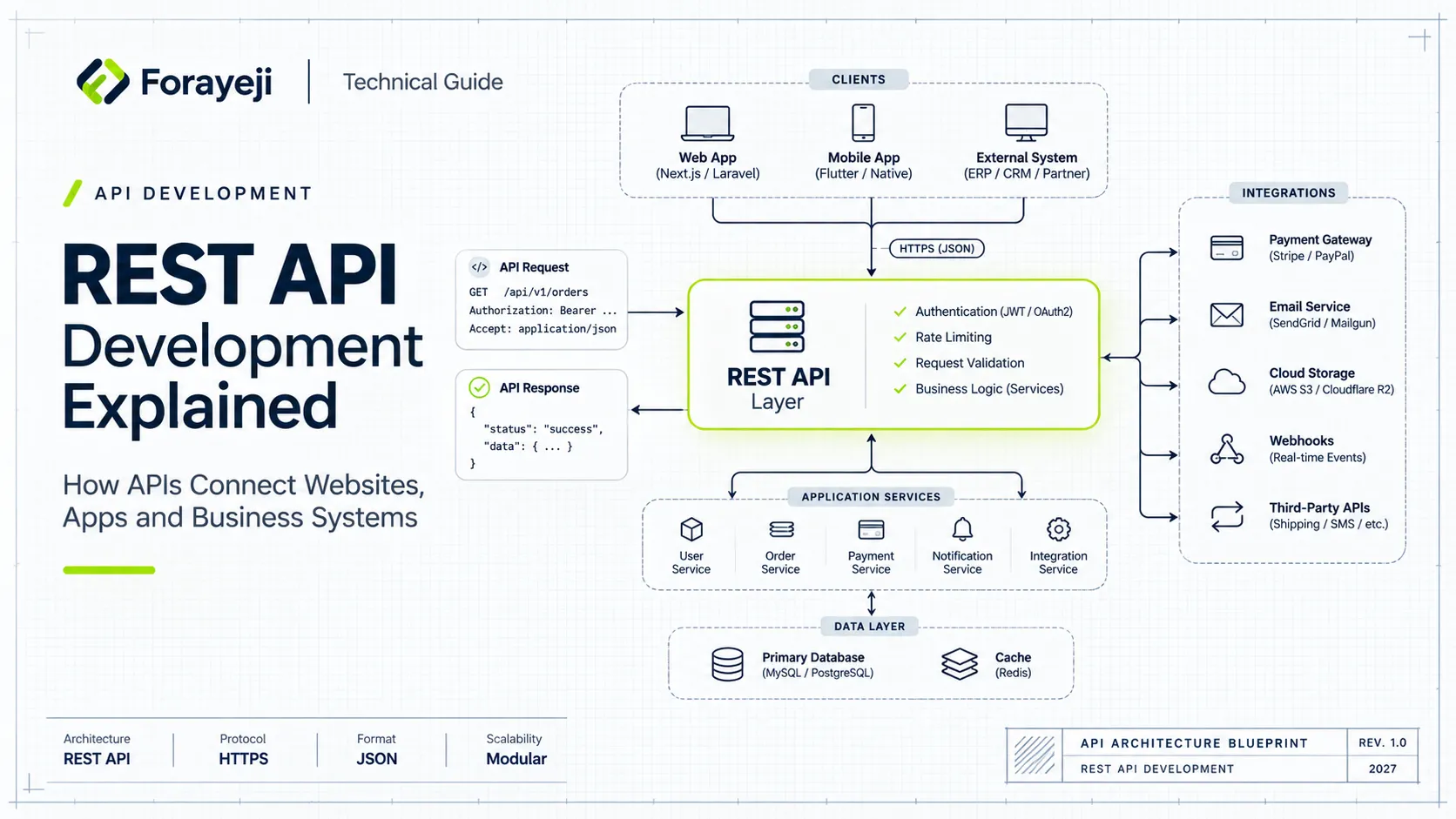
REST API development is the work of building the connection layer that lets your website, mobile app and business systems share the same data safely. A REST API is a set of web addresses that other software can call to read or change information, such as products, orders, customers or bookings, with clear rules about who may do what. Built well, it gives every part of your business one source of truth. Built badly, it becomes the easiest way into your data.
This guide explains what a REST API is, how it connects the systems you already use, and the rules we follow on every API we build: versioning, error handling, security and reliability. It is written for business owners and agencies, not only for developers.
What is a REST API?
API stands for application programming interface: an agreed way for one program to ask another for something. REST is the most common style of web API. Roy Fielding described it in his 2000 dissertation, and it runs on the same HTTP that serves web pages.
A REST API is organised around resources: the things your business works with. Each resource has an address, and the standard HTTP methods say what to do with it:
GET
/api/v1/ordersreads a list of orders.POST
/api/v1/orderscreates a new order.PATCH
/api/v1/orders/{id}changes part of one order.DELETE
/api/v1/orders/{id}removes it; in a well-built system it goes to a trash first, so it can be restored.
The answer comes back as JSON, a simple text format every programming language can read, together with an HTTP status code that says whether the request worked.
How APIs connect websites, apps and business systems
Most growing businesses end up with several systems: a website, an online shop, a mobile app, an accounting tool, a courier service, a CRM. Without APIs, someone copies data between them by hand. With a REST API in the middle, they talk to each other directly:
One backend for the website and the app. Your website and your Android and iPhone apps read the same products, prices and accounts from one API, so they never disagree.
Shops that update themselves. An online shop sends each paid order to the courier's API for a tracking number, and the courier calls back when the parcel is delivered.
Stock in one place. A stock management system shares the current stock with the shop, the point of sale and the warehouse at the same time.
Payments and accounting. Payment providers confirm payments through signed callbacks, and paid invoices flow into the accounting system without retyping.
Partners and agencies. A partner's system can place orders or read reports with its own limited access key, without ever signing in to your admin.
Custom web applications and business software are usually built API-first for exactly this reason: the API outlives any single screen. A website can be redesigned and an app rewritten while the API, and the data behind it, stays the same.
What good REST API development looks like
An API is a contract. Other systems depend on it, often systems you do not control, so it has to be predictable. Our development kit, the foundation under every project we build, turns that into written rules that are checked automatically before any code goes live. These are the ones that matter most to you as a client.
1. Versioned from the first day
Every address starts with a version, such as /api/v1/. New fields can be added to v1 safely, but anything that would break an existing app, such as removing a field or changing what it means, goes into a v2 while v1 keeps working. An old endpoint announces its retirement date in its response headers before it is switched off, so an app on someone's phone never breaks overnight.
2. One response shape and clear error codes
Every answer has the same structure: whether it worked, a short message for people, the data, and details such as the page number and a request ID. Every error carries a stable code, for example VALIDATION_FAILED, FORBIDDEN or RATE_LIMITED, and the correct HTTP status: 401 when you are not signed in, 403 when you may not do something, 404 when it does not exist, 409 when it was changed in the meantime, 422 when the input is invalid and 429 when there are too many requests. The app reacts to the code; the person reads the message.
3. Only the fields the client needs
Each response lists its fields on purpose. The API never dumps a database row, so internal columns, cost prices or private notes cannot leak by accident. A status comes with a readable label ("Approved") instead of a number only the database understands, and records are identified by long random IDs instead of 1, 2, 3. Sequential numbers let anyone guess the next customer's order; random IDs combined with ownership checks close that door. Broken object-level authorisation is number one on the OWASP API Security Top 10 for a reason.
4. Lists that stay fast
Every list is paginated, with at most 100 items per page, and offers only the filters and sort options that were deliberately allowed. Nobody can ask the API for "all orders ever" and slow the system down for everyone else, and nobody can sort or search by a column that was never meant to be public.
5. Safe to retry
Networks fail. When an app creates something with real-world effects, such as an order, a booking or a payment, it sends an idempotency key. If the request arrives twice because the connection dropped, the second one returns the first result instead of charging twice. Important records also carry a version number: if two people edit the same record, the second save is refused with a clear "this was changed" error instead of silently overwriting the first.
6. Documentation generated from the code
The documentation is generated from the code itself as an OpenAPI specification, together with a ready-to-use request collection and typed code for the frontend. It cannot drift out of date, because it is rebuilt from the same code that runs, and the build fails when the two do not match.
API security: the checks every request passes
An API is open to the internet by design, so security cannot be an afterthought. These layers are built into every API we deliver:
Authentication. Websites use secure session cookies; mobile apps and partner systems get tokens with limited permissions and an expiry date, which can be rotated or revoked. Administrators can be required to sign in with two-factor authentication.
Four independent checks. Who are you, are you allowed to do this, is this record within your scope (your own order, your own organisation), and does the business rule allow it right now (a paid invoice cannot be edited). Any one of them can say no.
Validation on the server. Every input is checked and cleaned by the server. Prices, discounts, totals, owners and statuses are never accepted from the app; the server calculates them.
Rate limits. Every endpoint has a limit that an administrator can adjust, with a minimum strictness for sign-in and one-time codes that cannot be switched off. Too many requests get a 429 answer with a "retry after" time.
Locked-down transport. HTTPS only, cross-origin access only from your own domains, and security headers on every response.
Secrets kept secret. Server keys live only in the server's environment. Keys for third-party services are stored encrypted and can be replaced but never read back.
Signed webhooks. Messages we send to other systems are signed with a timestamp, and messages we receive are verified before anything happens.
A trail for every action. Every response carries a request ID that links it to the logs, every change is recorded in an activity log and sensitive actions in a tamper-evident audit log, and passwords, tokens and card data are removed from the logs automatically.
Reliability when other systems are slow
An API that depends on a courier, a payment provider or an e-mail service has to keep working when one of them is slow or down. Slow work, such as sending e-mails, building reports or syncing with another system, runs in a background queue. Calls to outside services happen only after your data has been saved, through an outbox that retries them, so a courier outage never loses an order. Background jobs are written so that running one twice does no harm.
REST, GraphQL or webhooks?
REST is the right default for most business systems: simple, easy to cache, and understood by every tool and developer.
GraphQL lets an app ask for exactly the fields it wants in one request. It helps with very complex screens but adds complexity elsewhere, so we use it only when REST really does not fit.
Webhooks complement an API rather than replace it: instead of asking "anything new?" every minute, the other system tells you when something happens. Most integrations use REST for requests and webhooks for events.
How a REST API project runs
Map the systems and the data. Which systems need to talk, which data moves in which direction, and who may see or change what.
Agree the contract. The resources, fields, error codes and permissions, written down before the build starts, with a fixed quote.
Build and test. Automated tests for every endpoint, every permission and every error, including the requests that should be refused.
Document and hand over. The generated OpenAPI documentation and request collection, so your team or another developer can use the API straight away.
Launch and monitor. Health checks, error monitoring and request IDs make problems visible before your customers notice them.
If you are still choosing the platform around the API, read WordPress vs custom development; for what drives the budget, see how much a website costs in 2027.
Questions to ask before you hire an API developer
How do you version the API, and what happens to older apps when it changes?
What does an error look like, and can my app rely on the error codes?
How do you stop one customer from reading another customer's data?
Which values does the server calculate instead of trusting the app?
How are rate limits, tokens and secrets handled?
Where is the documentation, and how is it kept up to date?
What happens when a payment provider or courier is down?
Will I own the code and get access to the servers and accounts?
A developer who answers these clearly has built APIs before. For more on choosing a team, see how to choose a reliable development partner.
How Forayeji builds APIs
Forayeji Creative Agency is a development team in Bangladesh. We build REST APIs in Laravel, with Next.js websites and Flutter mobile apps on top, and apply the rules above to every project: versioned addresses, one response shape, explicit fields, permission checks on every request, server-side validation, rate limits, signed webhooks and documentation generated from the code. We connect websites, shops, apps, payment providers, couriers and business systems for direct clients, and work as the white-label development team behind agencies. You get a written plan and a fixed quote, weekly updates, and you own the code.
See our web application development and custom software development services, or tell us about your project and we will send you a quote within 48 hours.
No comments yet. Be the first.
Keep reading
More articles
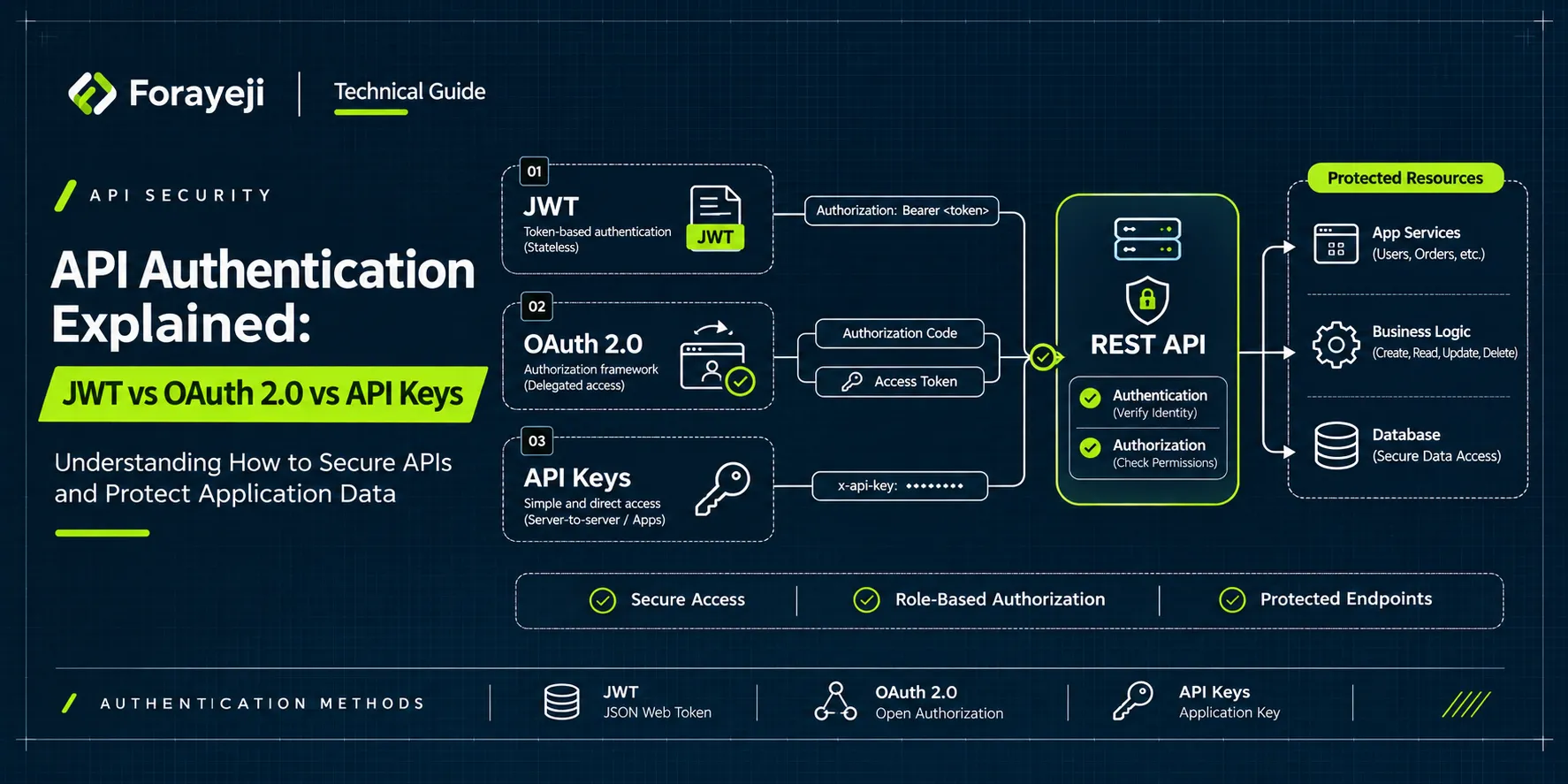
API Authentication Explained: JWT vs OAuth 2.0 vs API Keys
JWT, OAuth 2.0 and API keys solve different problems. Here is what each one is, when to use it, and how we combine all three in the Laravel and Next.js platform we build client projects on.

How to Choose a Reliable White-Label Web Development Partner in 2027
Choosing a white-label web development partner? Check these eight things in 2027: proof of similar work, fixed quotes you can mark up, communication, brand protection, code ownership, process and support, plus the red flags and questions to ask before you sign.

WordPress vs Custom Website Development: Which Is Right for Your Business in 2027?
Choosing the right technology for your business website is one of the most important decisions you will make before starting development. A website is more than an online presence. It can become your primary marketing channel, a lead-generation platform, a customer portal, or even an essential ...

How Much Does a Website Cost in 2027? A Plain-English Guide
If you've ever asked multiple web development agencies for a quotation, you've probably received very different answers. One agency might provide a relatively small estimate, another might quote several thousand dollars, while someone else might want to discuss your requirements ...
Next step
Have a project in mind?
Tell us what you're trying to achieve. We reply within one working day with honest advice and, if it fits, a written plan with a fixed quote.